
I recently took on my own version of the Cloud Resume Challenge. Instead of following the template step by step, I approached it the way I would build a real small-scale cloud platform for a client: security first, multi-account isolation, automation everywhere, and clean IAM boundaries.
Here’s a breakdown of what I built, what I learned, and the decisions that shaped this project.
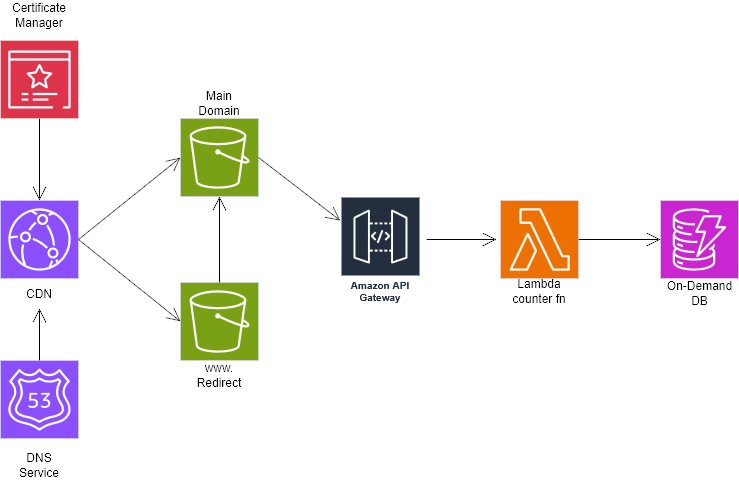
A secure multi-account AWS environment
Before even touching the website, I started by setting up a proper AWS foundation because IAM is the new perimeter, and building cloud projects in a single account without boundaries usually leads to bad habits.
AWS Organizations
I created a three-environment structure:
- Prod
- Dev
- Security
This allowed me to test changes safely and enforce guardrails consistently.
Governance & controls
To keep things clean and secure:
- I restricted all root actions.
- I prevented accounts from leaving the Organization.
- I set up billing alarms with multi-tier SNS notifications so any unexpected cost spikes trigger alerts.
These controls mirror how professional cloud teams operate and forced me to treat the entire environment like a real production setup.
A fully serverless résumé website
The résumé site itself is static, but I added a dynamic touch, namely a live visitor counter powered by API Gateway, Lambda, and DynamoDB.
S3 + CloudFront
The site is served securely via CloudFront with an Origin Access Control (OAC) to prevent users from bypassing CloudFront and accessing the bucket directly.
This part required some backtracking:
If you want to use OAC, your bucket must not be configured as a static website endpoint. It took a minute to fix my initial setup, but once corrected, the security posture improved dramatically.
Route 53 + custom domain
I created a custom domain for the root website, then:
- created an S3 bucket named after the domain,
- added a secondary bucket for redirection,
- pointed the domain to CloudFront, and
- enabled DNSSEC for added protection.
A dynamic visitor counter using Lambda + DynamoDB
For the serverless backend:
- DynamoDB stores the counter.
- Lambda increments and retrieves the count.
- API Gateway exposes a minimal REST endpoint.
The key here was getting permissions right:
- DynamoDB table policy allowing Lambda to read/write,
- Lambda execution role restricted to only what it needs,
- Tight CORS controls so only my domain can call the API.
Everything deployed through automation
Nothing was deployed manually.
Infrastructure as Code with Terraform
Every AWS resource (IAM policies, S3 buckets, CloudFront distribution, Dynamo tables, Lambda function) is defined in Terraform.
CI/CD with GitHub Actions
Any change to frontend files triggers:
- An automatic sync to S3
- Conditional CloudFront cache invalidation only for updated assets
This gave me a lightweight but production-ready deployment pipeline.
Final thoughts
This challenge was a great reminder that even a simple static website becomes a full cloud engineering project once you add real-world constraints like security, automation, and multi-account structure.
And that’s exactly why I enjoyed it. Find the end product here: https://pernelle-mensah.com